
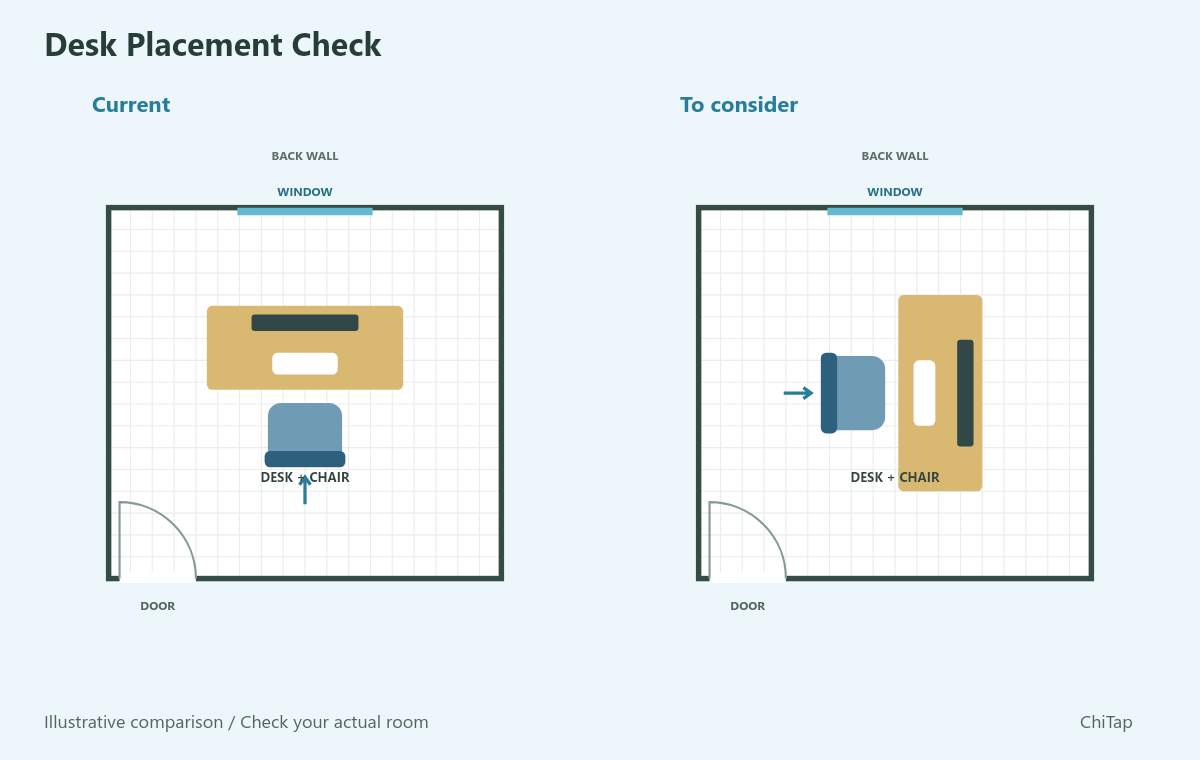
Start with the light, not a compass rule
A bright window behind a monitor and a reflection of a window in the screen are different problems. Both can make reading uncomfortable. Turn the screen off briefly and look for reflections from your usual seat. Then check it again while working, at the time of day you normally use it. A room that looks good on a cloudy morning may behave differently in afternoon sun.
Try a quarter-turn
When possible, compare your current position with the screen roughly at right angles to the window. Keep the desk and chair clear of the route to the door. A better lighting angle is not worth blocking access or stretching a power cable across a walkway. OSHA recommends placing screens at right angles to windows to reduce glare; blinds and other light controls may still be needed.
Let your writing hand have space
For writing on paper, test light coming from the side opposite your writing hand. That can reduce the shadow of your hand over the line you are writing. It is a useful starting point, not a fixed rule: a task lamp, several windows or a deep desk may change what feels comfortable.
When the desk has to stay
Adjust blinds, turn the monitor slightly, or move a task lamp before buying furniture. Keep the screen comfortably readable without a large bright window immediately behind it. Looking towards a door is a traditional feng shui preference, but the light, actual access and a usable work surface come first. Facing a wall is not a prediction of poor work or bad luck.
What the check can compare
The Desk Placement Check compares your selected seated direction, window, door, screen or paper work, and writing hand. It explains the suggested orientation. It does not measure daylight, workstation ergonomics or productivity, and it cannot inspect the space behind your chair. Optional compass labels add directional context, not a guarantee of a better result.